Why leave Google at all?
Google is the world's most-used search engine with a market share of around 90%. The service works well, is fast and usually delivers relevant results. But: you pay with your data.
Google collects metadataInformation about your searches: when do you search for what? From which device? From which location? How often? This data reveals a great deal about you. about every search query: timestamp, location, device, IP addressYour Internet Protocol address uniquely identifies your internet connection. If it is stored, it becomes traceable who searched for what and when.. This data is linked to your Google account and used for personalised advertisingAdvertising tailored to your personal profile. Google builds a detailed interest profile from your searches, websites visited and YouTube videos, and sells access to this to advertisers.. Google knows what you are searching for before you click "Search".
According to Google's privacy policy, the company analyses search queries to "improve services" and "deliver relevant advertising". In concrete terms this means: every search is stored, analysed and linked to your profile.
Studies show that Google's search results can be politically biased and that personalisation creates a filter bubbleYou only see content that matches your existing views. Divergent opinions are filtered out.: you only see what Google thinks you want to see.
The most important alternatives at a glance
1. DuckDuckGo – The US classic with a privacy focus

How does DuckDuckGo work? DuckDuckGo is a metasearch engineUses results from over 400 sources such as Bing, Yahoo, Wikipedia — but without passing on your data. that aggregates results from other search engines while anonymising your data. When you search, Bing only sees the request from DuckDuckGo — not from you.
DuckDuckGo shows every user the same results for the same search. No filter bubblePersonalised results based on your past behaviour — Google shows you what you want to see, not what is objectively relevant., no manipulation. What you search for stays private.
DuckDuckGo rates websites on privacy criteria (A to F) and shows you how many trackers have been blocked. The browser extensionA small programme you install in your browser to add extra features — for example blocking adverts, stopping trackers or changing the default search engine. "Privacy Essentials" automatically blocks advertising trackers and enforces encrypted connections.
Criticism: In 2022 it emerged that DuckDuckGo's browser allowed Microsoft trackers (a contractual condition for Bing access). The company resolved the issue and emphasises: the search engine was never affected, only the browser. Nevertheless, a breach of trust.
2. Startpage – Google results without Google tracking

How does Startpage work? Startpage acts as a proxyAn intermediary between you and Google. Google sees only Startpage, not you. between you and Google. You enter a search term, Startpage queries Google anonymously, retrieves the results and displays them to you. Google receives neither your IP address nor your search history.
The key feature: you get the same quality as Google (same algorithm), but without tracking. "Anonymous View" goes further still: when you click on a result, Startpage loads the page via a proxy — the target website cannot see your IP address either.
In 2019 the US advertising company System1 acquired a majority stake in Startpage. This attracted criticism within the privacy community. Startpage emphasises: the company remains headquartered in the Netherlands, all servers are in the EU, and privacy implementation remains with the founders. Nevertheless: the Netherlands is part of the Nine EyesIntelligence alliance: USA, UK, Canada, Australia, New Zealand + Denmark, France, Netherlands, Norway. They share surveillance data., an intelligence-sharing alliance.
3. Qwant – The French answer to Google

How does Qwant work? Qwant is one of the few European search engines with its own search index. That means Qwant crawls the web itself and builds its own search results. For some languages (English, German, French, Italian) Qwant uses entirely its own algorithms.
The results are supplemented by Bing data, but Qwant is working towards complete independence. Together with Ecosia (German search engine), Qwant is building the European Search Index "Staan"A European search index with no dependency on Google/Microsoft. Launched in Germany in 2025. — a shared European search indexA vast database of all websites visited by a crawler. Anyone without their own index must buy results from Google or Bing — and is therefore dependent on US corporations. free from US dependence.
Notable feature: Qwant displays results sorted by category: Web, News, Social Media, Shopping. The interface resembles a dashboard — clear, but takes some getting used to.
4. Ecosia – The search engine that plants trees

How does Ecosia work? Ecosia uses Bing search results (like many alternative search engines), but earns money through adverts in the search results. The twist: 80% of all profits go into tree-planting projects worldwide, 20% into renewable energy and sustainable projects.
Ecosia does not plant the trees itself, but finances partner organisations on the ground in over 35 countries (Brazil, Indonesia, Senegal, Burkina Faso, etc.). The projects focus on biodiversity hotspotsRegions with high biodiversity that are severely threatened and have already lost 70% of their original habitat. — areas where reforestation is most urgently needed.
Transparency as a principle: Ecosia publishes detailed financial reports every 6 weeks. You can see exactly how much money was earned and how many trees were planted. The plantings are verified via satellite imagery and manual counting.
In 2018 Ecosia transferred 99% of its shares to the Purpose FoundationA Swiss foundation that prevents companies from being sold or profits being withdrawn by shareholders.. This means: Ecosia cannot be sold, and no profits can be distributed to investors. The company effectively owns itself — permanently.
Privacy: Ecosia is more privacy-friendly than Google, but not as strict as DuckDuckGo or MetaGer. No user profiles are created, no data is sold to advertisers, no third-party trackers. Search queries are anonymisedThe link between your IP address and your search queries is deleted. After this, no one can trace who carried out the search. after 7 days. However, Ecosia must share some data with Bing (a contractual condition) — less than Google, but more than pure privacy search engines.
Criticism: Ecosia is primarily an environmental search engine, not a privacy search engine. Anyone wanting maximum privacy should use DuckDuckGo, Startpage or MetaGer. Anyone wanting to plant trees with every search will find Ecosia suitable. Additionally: the ecological impact of tree-planting is contested — some researchers argue that reforestation in tropical regions helps, while in temperate zones it is ineffective, and at high latitudes may even be counterproductive (darkening the Earth's surface leads to warming).
5. MetaGer – The German public-benefit search engine

How does MetaGer work? MetaGer is a metasearch engineQueries multiple search engines simultaneously (Bing, Yahoo, and others) and combines the results. that queries several search engines at once. You submit a query, MetaGer queries Bing, Yahoo and others in the background, removes duplicates and displays the combined results.
The advantage: you get a broader perspective than from a single search engine. No filter bubble. The queried search engines only see MetaGer's IP address, not yours.
Since 2024 MetaGer is no longer free to use. The reason: Microsoft massively increased the cost of Bing access. MetaGer now operates via a token systemDigital tokens you purchase and spend per search. 1,000 tokens cost €10; one web search uses approximately 3 tokens. Replaces the previous free model.: 1,000 tokens cost €10 and one web search uses approximately 3 tokens. Members of SUMA-EV can search without adverts.
MetaGer is operated by the non-profit association SUMA-EVAssociation for Free Access to Knowledge. Recognised as a non-profit, no commercial interests.. That means: no profit interests, no investors, no advertising (for members). The code is open source — anyone can verify what MetaGer does with your data (nothing).
Comparison at a glance
| Search engine | Country | Own index | Open source | Free | Key feature |
|---|---|---|---|---|---|
| DuckDuckGo | USA | (400+ sources) | Privacy Grade, browser | ||
| Startpage | Netherlands | (Google proxy) | Anonymous View, Google quality | ||
| Qwant | France | (partial) | EU index "Staan", Qwant Junior | ||
| Ecosia | Germany | (with Qwant) | 200+ million trees planted | ||
| MetaGer | Germany | (metasearch) | (token system) | Non-profit, University of Hanover |
Which search engine is right for me?
You want the simplest solution? DuckDuckGo. Simply set it as the default search engine in your browser. Works everywhere, no learning curve.
You want Google quality without Google tracking? Startpage. You get exactly the same search results as Google, but anonymously.
You want to support Europe? Qwant, Ecosia or MetaGer. All are European projects, all working towards independence from US tech corporations.
You want to do something good with every search? Ecosia. Roughly every 45 searches plants one tree. Over 200 million trees have already been financed.
You want maximum transparency? MetaGer. The code is open source, the operator is non-profit. No profit, no investors.
Practical switch: how to change your search engine
In every browser you can change the default search engine. You then search directly from the address bar, without visiting the website first.
Chrome: Settings → Search engine → Manage search engines → Add
Firefox: Settings → Search → Default search engine → Add more search engines
Safari: Settings → Search → Search engine
Edge: Settings → Privacy, search and services → Address bar and search
Most search engines offer browser extensions that automate the switch. Simply install, done.
For the technically minded: self-hosting your own search engine
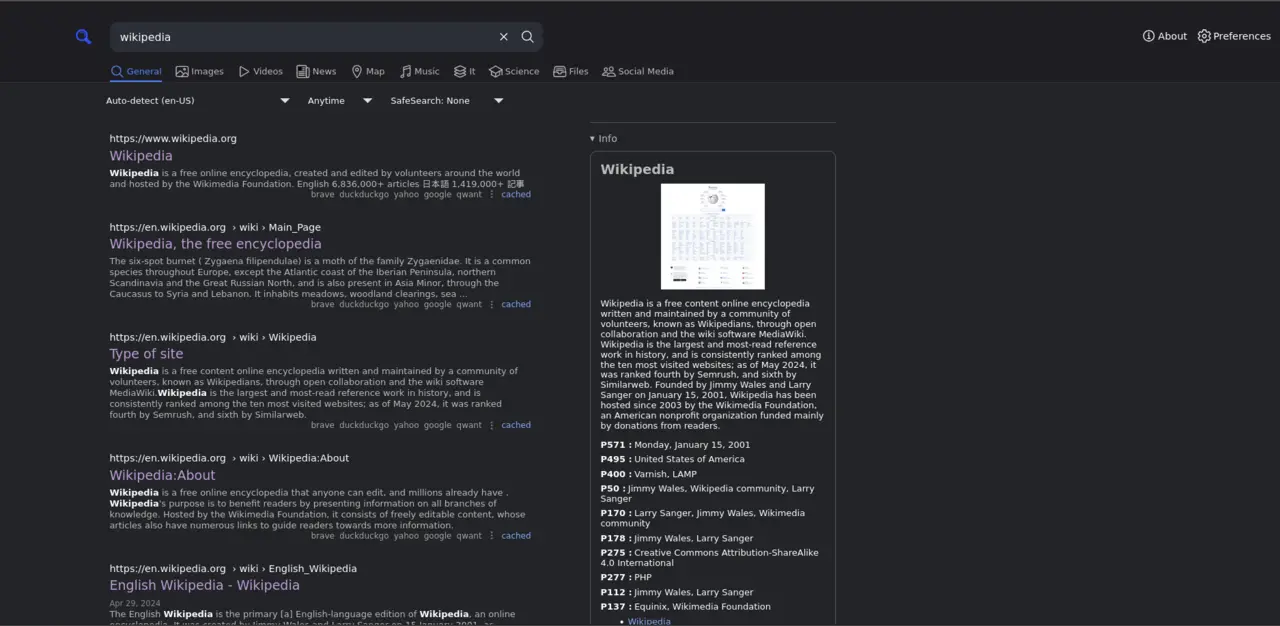
For anyone who finds even DuckDuckGo and co. insufficiently private, it is possible to host a search engine entirely yourself. The most popular solution is called SearXNG — an open-source metasearch engine you can run on your own server.
What is SearXNG?
SearXNG is a self-hosted metasearch engineYou install the software on your own server or computer. All search queries run through your machine.. The programme queries other search engines (Google, Bing, DuckDuckGo, over 230 sources) and shows you the results — but no one other than you can see what you are searching for.
The difference from public search engines: the search queries go directly from your server to Google, Bing and so on. No third party in between. You have full control.
What hardware do I need?
The requirements are surprisingly modest. SearXNG runs on:
- Raspberry Pi or similar mini-PCs
- NAS systems (Synology, TrueNAS, etc.)
- VPSVirtual Private Server: a rented server in a data centre on which you can install your own software. From approximately €2/month with providers such as Hetzner, Netcup or Contabo. (Virtual Private Server) from approximately €2/month
- Your laptop or desktop PC running in the background
Minimum requirements:
- CPU: 1 core (64-bit)
- RAM: 512 MB (recommended: 2 GB)
- Storage: approx. 20 GB
This is entirely sufficient for personal use. Successful installations run on a VPS with just 1 vCPU and 512 MB RAM.
How does installation work?
SearXNG runs as a Docker containerA packaged software bundle that runs on any system. Easy to install and update. — which makes installation very straightforward. You do not need Linux expertise; most guides come down to copy-and-paste.
For the technically interested, there are detailed tutorials on GitHub and in the SearXNG community. The entire process takes around 30–60 minutes.
You can customise SearXNG completely: which search engines should be queried? Which categories interest you? Dark design or light? All configurable. And: the search engines only see your server's IP address, not your personal IP (if you wish, you can run the server via VPNVirtual Private Network: encrypts your internet connection and routes it through another server. Hides your real IP address from the queried search engines.).
Who is this for? For tech enthusiasts who want maximum control. For everyone else, DuckDuckGo, Startpage or Qwant is entirely sufficient. Self-hosting is not a necessity, but an option for those who enjoy tinkering.
Conclusion: it doesn't have to be Google
The days when Google was the only usable search engine are over. DuckDuckGo, Startpage, Qwant and MetaGer deliver good results — without tracking you, without an ad profile, without selling your data.
The switch is simple: open your browser settings, change the search engine, done. You do not need to get used to a new interface; the search experience works just like Google.
What you gain: privacy. No profiles, no tracking, no personalised advertising. Just searching, results, done.
Beginners: DuckDuckGo — simple, fast, works everywhere
Google quality without Google: Startpage — same results, anonymously
Europe supporters: Qwant — own index, GDPR-compliant
Environmentally conscious: Ecosia — 200+ million trees planted, transparent
Transparency advocates: MetaGer — open source, non-profit
Google earns billions from knowing you. These alternatives earn their money from advertising that matches your search term — not your profile. The difference: you are the customer, not the product.