
Why switch at all?
Google Mail (Gmail) is the world's largest email provider with over 1.8 billion users. The service is free, convenient and feature-rich. But there is a price: your data.
Gmail uses TLS encryptionTransport Layer Security: encrypts only the transmission path between your device and Google's servers — not the emails themselves once stored on the server., which protects data in transit. But on Google's servers, emails are stored unencrypted. Google can read them — and does.
According to Google's privacy policy, the company analyses email content for "personalised features" such as smart replies and spam filters. Although Google has claimed since 2017 that it no longer scans emails for targeted advertising, metadataData about data: not the content of your email, but who writes to whom, when and how often. Sufficient to fully reconstruct relationship networks, daily routines and contacts. (who writes to whom, when, how often) is still collected and linked to your Google profile.
The French data protection authority CNILCommission Nationale de l'Informatique et des Libertés: the French data protection authority. Regarded as one of the strictest in Europe and has already imposed million-euro fines on Google and Meta. fined Google in September 2025 for Gmail advertising without sufficient user consent.
On top of that: Gmail servers are located in the US and fall under the CLOUD ActClarifying Lawful Overseas Use of Data Act: US law that grants American authorities access to data held by US companies — even when the servers are located abroad.. US authorities can demand access to your data, even without a court order. The US is part of the Five EyesIntelligence alliance comprising the US, UK, Canada, Australia and New Zealand. These countries systematically share surveillance data with one another., an intelligence alliance that systematically collects and shares data.
What is the problem with Outlook & Yahoo?
Microsoft Outlook and Yahoo share similar problems with Gmail: no end-to-end encryptionE2EE: only the sender and recipient can read the message. Even the email provider has no access to the content., servers in the US, data sharing with third parties. Outlook scans emails for AI features and security checks; Yahoo has a long history of data breaches and scandals.
End-to-end encryption: how it works
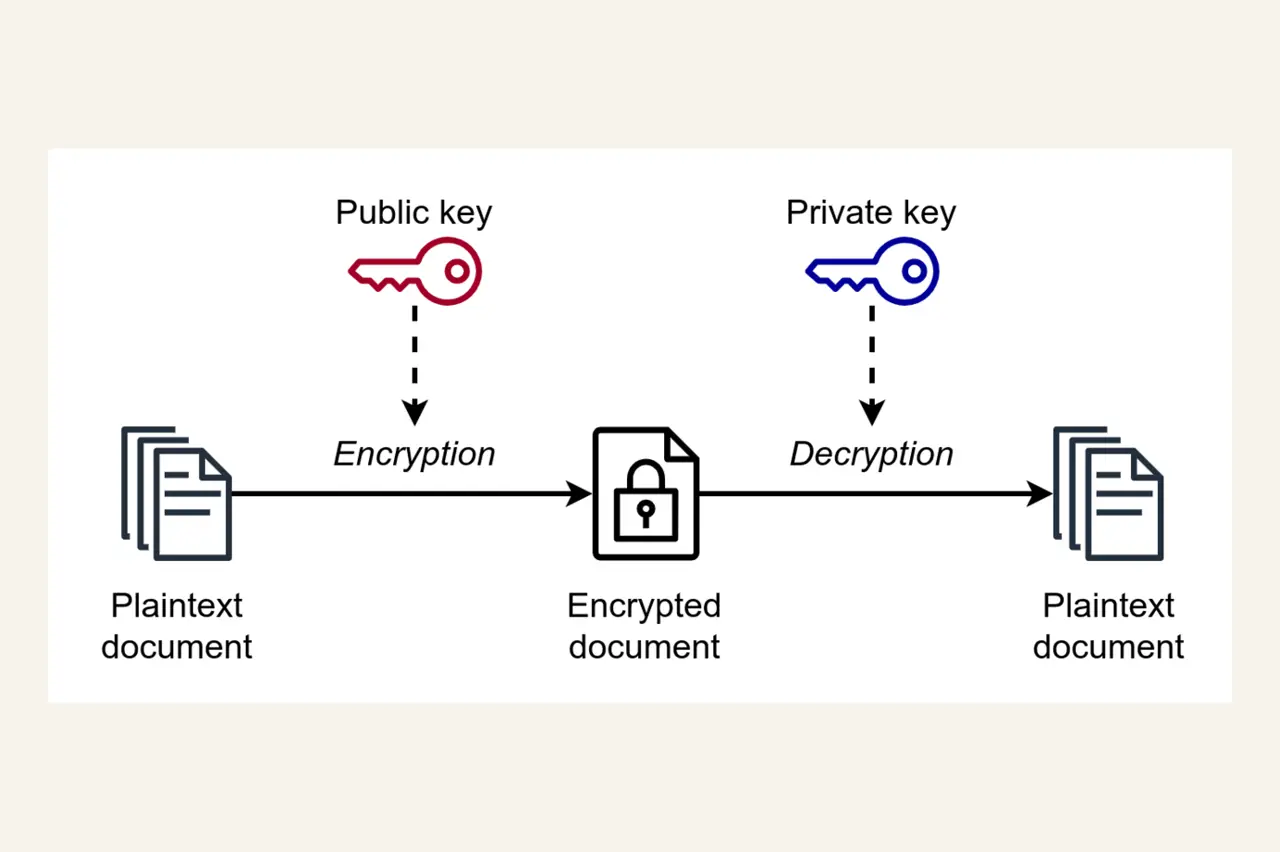
End-to-end encryptionWith E2EE, the message is encrypted on the sender's device and only decrypted on the recipient's device. The email provider cannot read the content. (E2EE) means: the email is encrypted on your device before it is sent. Only the recipient can decrypt it using their private key. The email provider sees only an encrypted jumble of characters.
This works through asymmetric encryptionTwo keys per user: a public key for encrypting (visible to anyone) and a private key for decrypting (only you have it).: every user has two keys — a public one (for encrypting) and a private one (for decrypting). If you want to send me an encrypted email, you use my public key. Only I can read it using my private key.
Even with E2EE, metadata cannot be completely hidden:
- Sender and recipient: email addresses must be readable so the message can be delivered
- Timestamp: when was the email sent?
- Subject line: not encrypted by some providers (e.g. Proton Mail) but encrypted by others (e.g. Tuta)
Secure providers minimise this data and delete it regularly.
The European alternatives
1. Proton Mail – The Swiss fortress
Key feature: Proton Mail uses the OpenPGP standardOpen Pretty Good Privacy: a widely used standard for email encryption, in use since 1991. Open source and audited by cryptography experts., which means you can exchange encrypted emails with anyone who uses PGP — not just other Proton users. This is a significant advantage over closed systems.
However: the subject line is not encrypted with OpenPGP (the standard does not yet support this). Anyone who wants to encrypt everything must use a provider such as Tuta.
Switzerland is not part of the EU but has its own strict data protection laws. The country is considered one of the best locations for privacy services. Proton does also have offices in the US — however, the company emphasises that all data is stored exclusively on Swiss servers.
2. Tuta (formerly Tutanota) – The German privacy bastion
Key feature: Tuta encrypts not only the email body but also the subject line. Tuta also already uses quantum-safe algorithmsEncryption methods that cannot be broken even by future quantum computers. Tuta uses Kyber-1024, a post-quantum algorithm. — making the service future-proof against attacks by quantum computersFuture supercomputers that could crack today's encryption in minutes. Intelligence agencies are already storing encrypted data now to decrypt it later using quantum computers ("Harvest Now, Decrypt Later")..
According to the 2025 transparency reportA public report in which email providers disclose how many government requests they receive and how many were rejected. Shows how often the state seeks access to user data., Tuta rejected 75% of all government requests — mostly because accounts did not exist or requests were defective. Authorities must create their own Tuta account to submit encrypted data requests.
3. Mailbox.org – The German business professional
Key feature: Mailbox.org is ideal for small businesses and teams. You get not just email but a complete groupware suiteA combination of email, calendar, contacts, task management, cloud storage and office applications — all encrypted and GDPR-compliant. with calendar, contacts, cloud storage (encrypted), office documents and video conferencing. All in one place, all encrypted.
The 2025 transparency report shows: Mailbox.org rejected 24% of all government requests — mostly because they arrived unencrypted. Germany's Federal Network Agency requires that government requests be submitted in encrypted form. Many investigators ignore this.
4. Posteo – Minimalist and sustainable
Key feature: Posteo collects as little data as possible. You do not need to provide any personal details to register. You can even pay by cash in a letter — in which case there is no connection whatsoever between you and the account.
Posteo does not store IP addresses by default. Germany's Federal Constitutional Court ruled in 2019 that email providers must store IPs under court order — but only for that specific case, not as a general rule.
The transparency report shows: in 2025 Posteo received 85 government requests, of which 35 (41%) were rejected — mostly due to missing encryption or formal errors. Posteo filed 27 complaints with data protection authorities.
Further European providers
StartMail (Netherlands)
StartMail is operated by the makers of the privacy-focused search engine Startpage. The Dutch service relies on PGP encryptionPretty Good Privacy: the encryption standard for emails, the basis for OpenPGP. Can communicate with any other PGP client. and unlimited email aliases — handy for creating a separate disposable address for every newsletter or online shop.
The Netherlands is part of the Nine Eyes AllianceAn extension of the Five Eyes adding Denmark, France, the Netherlands and Norway. Intelligence data is shared among these countries as well. (an extension of the Five Eyes). This means Dutch authorities could theoretically share data with US intelligence agencies. However, StartMail is subject to the GDPR and Dutch data protection law.
Price: From €2.50/month, no free version (but 30-day money-back guarantee)
Mailfence (Belgium)
Belgian service with OpenPGP encryption. In addition to email, it also offers a calendar, contact management, groups and file storage. Belgium has strong data protection laws and is not part of the Five/Nine/Fourteen Eyes.
Price: Free plan (500 MB) or from €3.50/month
Comparison at a glance
| Provider | Country | E2EE | Subject encrypted | Open source | Free plan | Paid price |
|---|---|---|---|---|---|---|
| Proton Mail | Switzerland | 1 GB | from €3.99 | |||
| Tuta | Germany | 1 GB | from €3 | |||
| Mailbox.org | Germany | (with PGP) | from €3 | |||
| Posteo | Germany | (with PGP) | partial | €1 | ||
| StartMail | Netherlands | (with PGP) | from €2.50 | |||
| Mailfence | Belgium | 500 MB | from €3.50 |
Practical tips for switching
1. Test first, switch later
Almost all providers have free plans or trial periods. Create an account, test the interface, send a few emails. Get used to how it works before switching completely.
2. Set up email forwarding
In your old Gmail/Outlook account you can set up automatic forwarding to your new address. That way you miss nothing while gradually updating all your services.
Forwarded emails pass through the old provider's servers and are not end-to-end encrypted. Forwarding is only a transitional solution.
3. Migrate important services step by step
Make a list of all the important services linked to your old email address: online banking, social media, shopping accounts, newsletters. Update them one by one. Start with the least important and finish with your bank and government services.
4. Use email aliases
Many secure providers offer aliasesAdditional email addresses that all arrive in your main inbox. Use a separate address for every online shop, every registration — if spam arrives, simply delete the alias. Your main address stays clean. (e.g. StartMail offers unlimited aliases). Use a separate address for every online shop and every registration. Getting spam? Just delete the alias. Your main address stays clean.
5. Encryption with non-encrypted contacts
What if the other person uses Gmail? Proton Mail and others offer password-protected emails: the recipient receives a link and must enter a password that you share separately (e.g. by SMS). Not perfect, but better than plain text.
Conclusion: it's easier than you think
Switching to an encrypted email service is not rocket science. Providers have invested heavily in usability in recent years. Proton Mail, Tuta and others are just as easy to use as Gmail — just without advertising, without tracking and with genuine encryption.
You do not need to be a cryptography expert. Encryption runs automatically in the background. You write emails as usual. The only difference: nobody except you and the recipient can read them.
Beginners: Proton Mail or Tuta — both have good free plans and are very beginner-friendly.
Privacy purists: Posteo (anonymous registration) or Tuta (quantum-safe, everything encrypted).
Business/teams: Mailbox.org (office suite included) or Proton (with Proton Drive, Proton Calendar).
Google, Microsoft and Co. earn billions from your data. European providers earn their money from subscription fees — not from advertising. That means: you are the customer, not the product.